
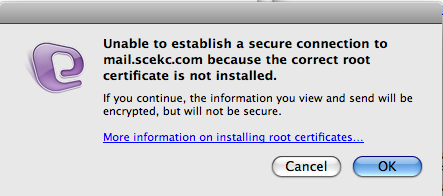
 After performing a clean install of Microsoft Office 2008, Entourage began to give me the following error:
“Unable to establish a secure connection to servername because the correct root certificate is not installed.”
I followed various post regarding installing our Exchange Server’s certificate. After installing this, I began to receive this error:

“Unable to establish a secure connection to servername because the server name or IP address does not match the name or IP address on the server’s certificate. If you continue, the information you view and send will be encrypted, but will not be secure.”
Clicking okay, will allow Entourage to connect – but the error will return and is annoying.
However, the error continued. After much experimenting, I was able to resolve the issue, but the error is so ambiguous, that it can be caused from several different misconfigurations.
If you desire to use SSL, your server must have a valid certificate. If the certificate is through a public provider, I don’t believe you will not need to install any certificates at all. If your system admin has provided you a private certificate you will need to install it into Keychain Access. Install it to system chain if all users on the computer will need it, or to login chain if only you need it. There are several documents on the web for doing this. However, if you have installed the certificate, and you still receive this error, read on.
 RESOLUTION
Several blogs have discussed the new AutoDiscovery Service issue within Exchange 2007, however we use Exchange 2003.
The problem with my Entourage was being caused by our domain structure. The hardware firewall passes mail ports to the Exchange server. The Exchange server has a public accessible Security Certificate through GO DADDY.
However, the LDAP port is forwarded to the domain controller running the Active Directory. Because in our setup, we don’t publish a separate internet host record the LDAP (for example ldap.mydomain.com), there is no way for the machine name listed in the certificate for mail.mydomain.com to match 2 different machines (the Exchange server and LDAP server). Therefore the error is valid, and not a Microsoft bug in Office/Entourage.
Since the LDAP lookup is what was causing the error, the error would not popup until a lookup function was needed. Because of this, it was possible to have Entourage sessions without getting this dialog. In order to prevent this error, do not require LDAP functions to connect securely.
- Under the ENTOURAGE menu select ACCOUNT SETTINGS
- Double click your Exchange Account.
- Select the Advanced Tab under the EDIT ACCOUNT dialog.
- Ensure “This LDAP server requires a secure connection (SSL)” is NOT selected.
 All mail activity is still handled through an SSL secure connection to the Exchange server. Only directory lookup function is changed. Some organizations allow non-secure LDAP access, if yours does not and you are using a separate server for LDAP functions. Then it will be necessary to obtain a certificate that has a matching internet host record to machine name. You can also ignore the dialog box safely – though it is very inconvenient.
You can also use this procedure to ensure the error is being caused by LDAP functions.
CONCLUSION
At the very least, I can reassure you that OSX 10.5.6 and Microsoft Office for the Mac (Entourage) 12.1.5 do work together without error. Microsoft has fixed whatever error/bug was involved, so don’t give up trying to resolve it. And definitely don’t wait in vain for Microsoft’s next update to do so.
JAN


About the Author:
The System Administrator is responsible for this website's functions. Content provided under the System Administrator's role is provided by various Subject Matter Experts and external sources. If you have questions regarding the content, please contact your Customer Service Representative.